
Table of Contents
Introduction: The Rise of the Home Office & Why Essentials Matter
The shift towards remote and hybrid working has dramatically accelerated in recent years, and 2026 sees a significant proportion of the UK workforce regularly operating from home. A well-equipped home office is no longer a luxury, but a necessity, impacting productivity, wellbeing, and your professional image. Investing in the right essentials creates a dedicated workspace free from distractions, fostering focus and efficiency. Furthermore, HMRC allows eligible home workers to claim tax relief on certain expenses, such as a portion of utility bills and business costs – always refer to the official HMRC guidance for up-to-date information.
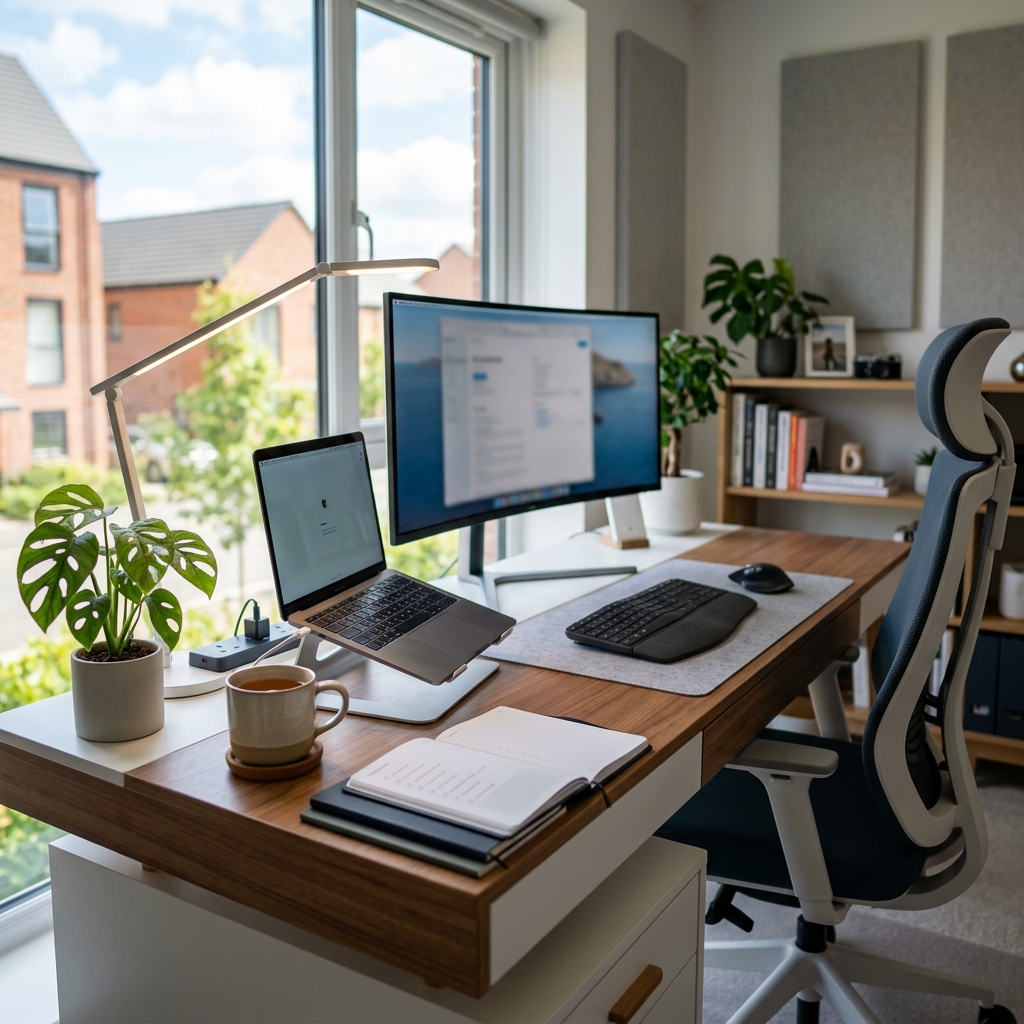
1. The Foundation: Desk & Chair – Ergonomics are Key!
The desk and chair form the core of your home office. Prioritise ergonomics to avoid long-term health issues. Consider these options:
Desks
- Standard Desk: Suitable for smaller spaces, from around £100 – £400.
- Standing Desk: Promotes movement and can reduce back pain. Adjustable height desks are now commonplace, typically ranging from £250 – £800+.
- Corner Desk: Maximises space utilisation, ideal for larger home offices, costing £150 – £600+.
- Size: Ensure the desk is large enough to comfortably accommodate your monitor(s), keyboard, mouse, and other essentials.
Chairs
An ergonomic chair is arguably the most important investment. Look for adjustable height, lumbar support, armrests, and a breathable fabric. The Herman Miller Aeron Chair (£1750.0) remains a top choice, though many excellent alternatives are available from £200 upwards.
Health Risks of Poor Setup: Prolonged sitting with poor posture can lead to back pain, neck strain, carpal tunnel syndrome, and even cardiovascular problems. Regular breaks and a well-designed ergonomic setup are crucial.
2. Tech Toolkit: Computers, Monitors & Peripherals
Choosing the right technology depends on your work requirements.
Laptops vs. Desktops
- Laptops: Offer portability and convenience, starting around £500.
- Desktops: Generally provide more power and customisation options, typically from £600.
Monitors
A good monitor is essential for eye comfort and productivity. The BenQ GW2780T 27 inch IPS Monitor (£229.0) is a solid all-rounder. Consider resolution (1080p, 1440p, or 4K) and screen size (24-27 inches is a popular choice). Dual monitors can significantly boost efficiency for many tasks.
Peripherals
- Keyboard & Mouse: The Logitech MX Master 3S Wireless Mouse (£99.99) is highly rated for comfort and functionality. Ergonomic keyboards can also help prevent strain.
- Webcam: Essential for video conferencing. A decent webcam costs from £30 – £150.
- Headset: Noise-cancelling headsets improve audio quality during calls, priced from £50 – £200+.
Operating Systems
- Windows: The most popular choice, offering wide software compatibility.
- macOS: Known for its user-friendliness and creative software.
- ChromeOS: A lightweight and secure option, ideal for web-based tasks.
3. Connectivity: Broadband, Router & Network Security
Reliable internet is paramount. In 2026, average UK broadband speeds are around 68 Mbps, but fibre optic connections are increasingly common. The BT Halo 2 Full Fibre Broadband (500Mbps) (£35.0) is a good example of a current offering.
Router Options
- Wi-Fi 6: The current standard, offering improved speed and capacity.
- Wi-Fi 6E: Adds a 6GHz band for less congestion.
- Wi-Fi 7: The latest standard, promising even faster speeds and lower latency.
Network Security
Protect your network with a strong password, enable your router’s firewall, and consider using a VPN for added security, especially when using public Wi-Fi.
4. Staying Connected: Communication & Collaboration Tools
Essential software includes:
- Video Conferencing: Zoom, Microsoft Teams, Google Meet.
- Instant Messaging: Slack, WhatsApp.
- Project Management: Asana, Trello.
Remember to comply with UK data privacy regulations (GDPR) when handling personal data.
5. Printing & Scanning: Still Relevant in 2026?
While the move towards paperless offices continues, a printer/scanner can still be useful. The Brother MFC-J497DW All-in-One Printer (£199.0) offers printing, scanning, copying, and faxing capabilities. Features like wireless connectivity and automatic document feeders add convenience.
6. Lighting & Environment: Creating a Productive Atmosphere
Natural light is ideal, but supplement with desk lamps and ambient lighting. Warm colour temperatures (2700-3000K) are generally more relaxing, while cooler temperatures (4000-6500K) can enhance focus. Adding plants and personal décor can improve wellbeing.
7. Storage Solutions: Keeping Your Workspace Organised
Invest in filing cabinets, shelves, desk organisers, and cable management solutions to maintain a clutter-free workspace. A tidy workspace promotes focus and efficiency.
8. Essential Office Supplies: Don’t Get Caught Short!
- Pens, pencils, highlighters
- Paper, notebooks
- Stapler, tape, scissors
- Sticky notes
- Eco-friendly options are available for many supplies.
9. Health & Wellbeing: Prioritising Your Physical & Mental Health
Take regular breaks, stretch, and maintain good posture. Ergonomic accessories like wrist rests and footrests can help. Utilise mental wellbeing resources available in the UK, such as NHS Every Mind Matters.
10. Security & Backup: Protecting Your Data
Back up your data regularly using cloud storage or external hard drives. Be aware of cybersecurity threats (phishing, malware) and practice safe browsing habits. Refer to the National Cyber Security Centre for advice.
Conclusion: Your Home Office – A Hub for Success
Creating a productive and comfortable home office is a worthwhile investment. By prioritising ergonomics, technology, connectivity, and wellbeing, you can create a space that supports your success and contributes to a healthy work-life balance. Tailor your setup to your individual needs and enjoy the benefits of a dedicated workspace.
FAQ
Q: What are the tax benefits of working from home in the UK?
You may be able to claim tax relief for certain household expenses related to your work, such as a portion of your heating, electricity, and internet bills. Check the HMRC website for current guidance.
Q: How important is an ergonomic chair?
Extremely important! A good ergonomic chair can prevent back pain, neck strain, and other health issues associated with prolonged sitting. It’s one of the most valuable investments you can make.
Q: What broadband speed do I need for home working?
At least 30 Mbps is recommended for basic home working. However, if you regularly participate in video conferences or transfer large files, 50-100 Mbps or higher is preferable.
Q: Is a separate monitor essential?
Not essential, but highly recommended. A second monitor can significantly boost productivity by allowing you to view multiple applications simultaneously.
Q: How can I improve the lighting in my home office?
Maximise natural light whenever possible. Supplement with desk lamps and ambient lighting. Choose warm colour temperatures for a relaxing atmosphere and cooler temperatures for enhanced focus.